
For Isaiah

AAC communication appBeta

For Isaiah, a free communication app for iPad and iPhone: A voice for Isaiah, and for anyone who needs one.

For Isaiah is a free communication app for iPad and iPhone. Tap a picture or a word and it speaks out loud, so someone who can't use their voice can still talk with the people they love.

  • Free
  • iPad · iPhone
  • No ads · no account
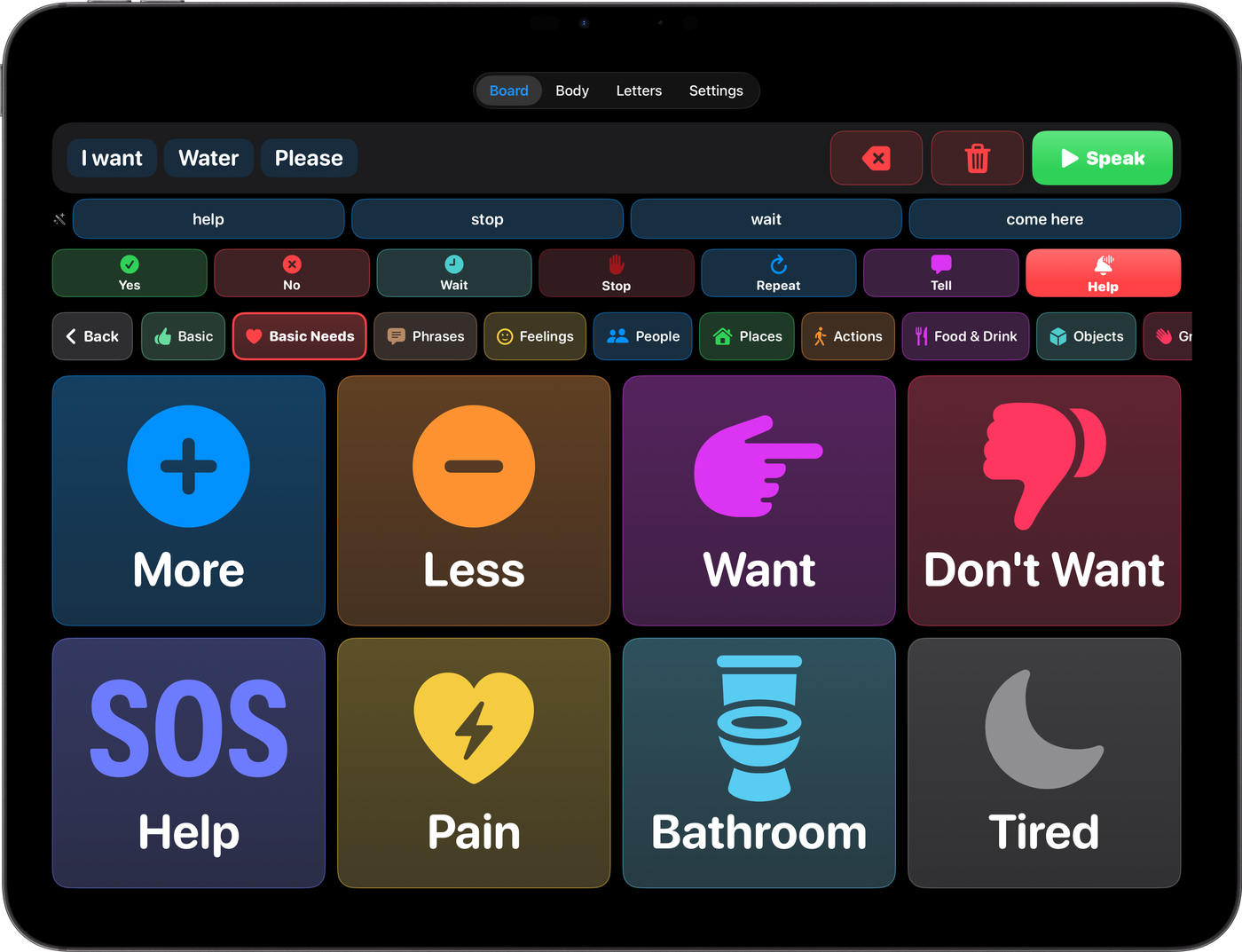
For Isaiah on iPad in landscape, in dark mode: the sentence “I want water please” with a green Speak button, suggested words, quick Yes, No, Wait, Stop, Repeat, Tell and Help buttons, a row of categories, and large colored buttons for More, Less, Want, Don't Want, Help, Pain, Bathroom and Tired
Black-and-white photo of Isaiah and his mom, smiling with their heads resting together
Isaiah & his momThe reason this app exists

Meet Isaiah

Made for one family. Free for every family.

I built For Isaiah for my partner's son, Isaiah. After an accident, he can't speak with his voice anymore, but he understands everything you say to him. I wanted him to be able to tell his mom what he needs, and talk with his family and friends, without anyone having to guess.

Every button, color and setting was shaped around him: big buttons that are easy to hit, support for head and eye tracking, a Help button that calls a caregiver, and his family's own recorded voices. All of it was dialed in alongside hospital staff and specialists, so it works for the people who need it most.

It's free, with no ads and no in-app purchases, because no family going through something like this should have to pay to be heard.
Send Isaiah a wish

What it does

Everything in one place, one tap away.

WORD BOARD

Tap to talk

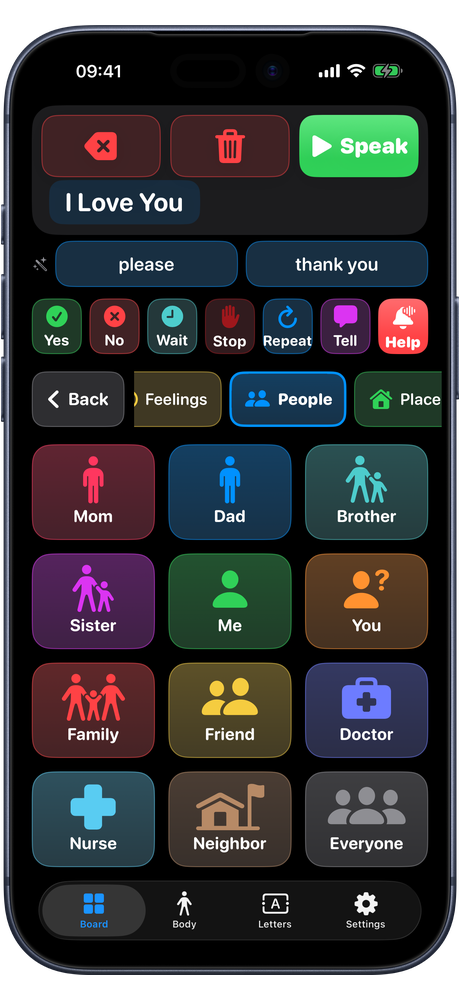
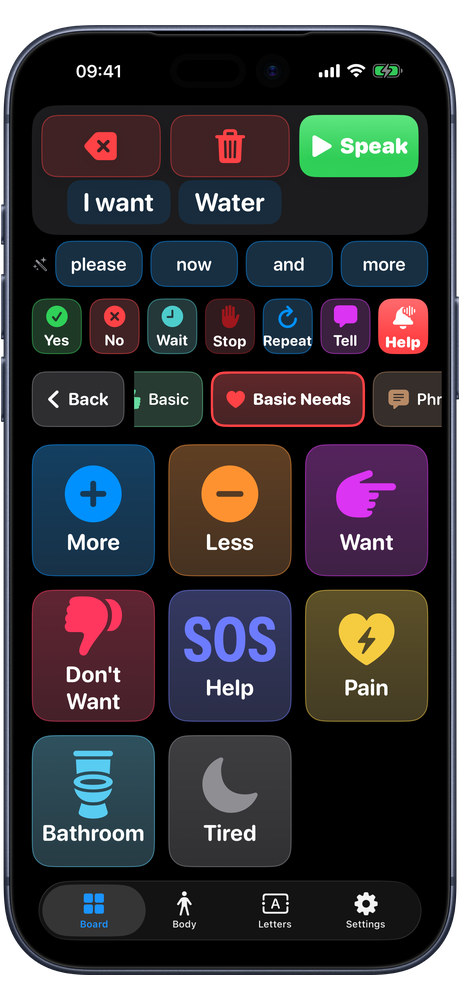
Pictures and words in color-coded categories, from Basic Needs and People to Places, Food & Drink and Feelings. Tap one and it speaks.

SENTENCES

Say more than one word

Build a sentence across categories, with suggested next words and recently used words close at hand, then press Speak.

BODY & PAIN

Show where it hurts

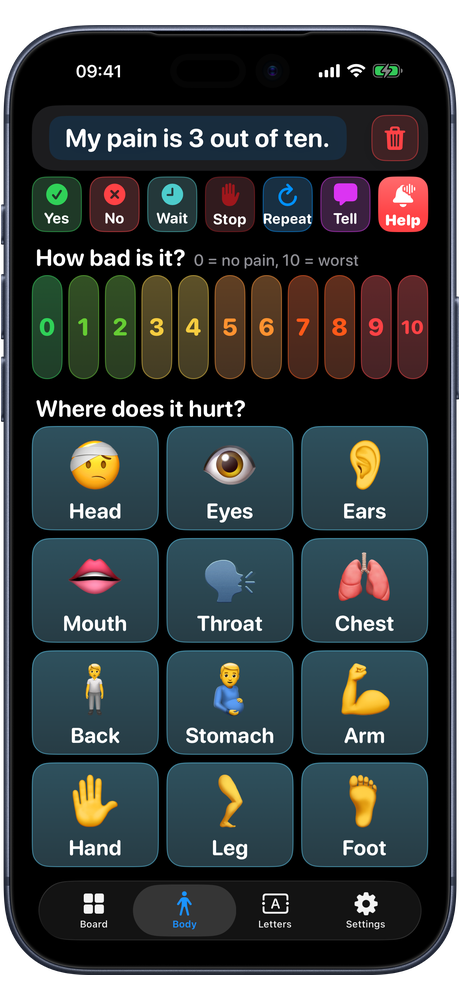
A 0 to 10 pain scale and a body map, so a nurse or a parent knows where it hurts and how much.

LETTERS

Spell anything

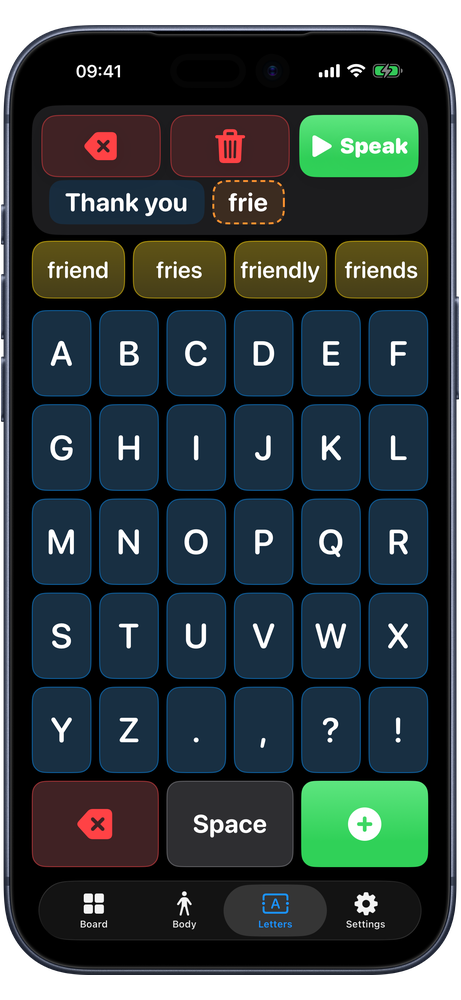
A big letter board with word prediction for the words that aren't on a button yet.

HELP

Call a caregiver

A red Help button, always on screen, sounds an alarm, vibrates and flashes to bring someone right away.

SIMPLE MODE

For the hardest days

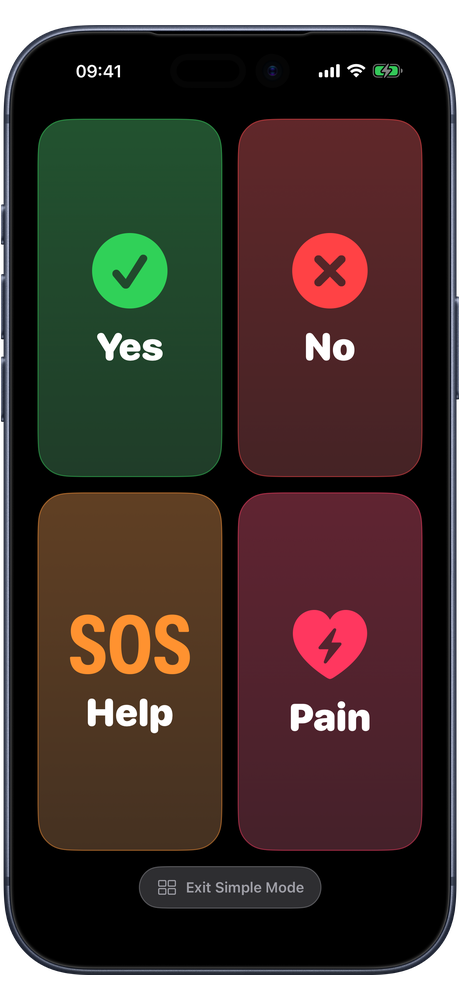
Four giant buttons, Yes, No, Help and Pain, that a family can change to whatever matters most.

Accessibility first

Many ways in, one voice out.

Not everyone can tap a screen. Every part of For Isaiah works by touch, head tracking, eye tracking, Switch Control or a keyboard, so each person can use whatever works for them.

Made alongside hospital staff and specialists. The colors, button sizes, controls and features were tested and tuned with the people who care for patients every day, to work for people with red, green or blue color blindness, low vision, and limited motor control.

X“Yes”
Z“No”
Keyboard hotkeys: press one key, hear a whole phrase
  • Head tracking, eye tracking and Switch Control. Works with the iPad's built-in pointer controls, plus VoiceOver labels on every button.
  • Keyboard hotkeys. Connect a keyboard and a single key speaks a whole phrase, right away, on any screen. X says “Yes” and Z says “No” out of the box, and caregivers can set any key to any phrase.
  • Big, steady targets. Buttons grow to fill the screen, and Prevent Repeats ignores accidental double taps and dwell repeats.
  • Easy to see. Colors chosen to stay easy to tell apart with color blindness and low vision, in light and dark mode, plus High-Contrast Colors with a color you choose.
  • Family voices and faces. Record a loved one's voice for any button, and add photos of the real people in someone's life.
  • Made with caregivers. A Communication Card that explains to new people how to talk with him, a settings lock, and eye-response tests for therapy check-ins.

iPad

Room for big buttons.

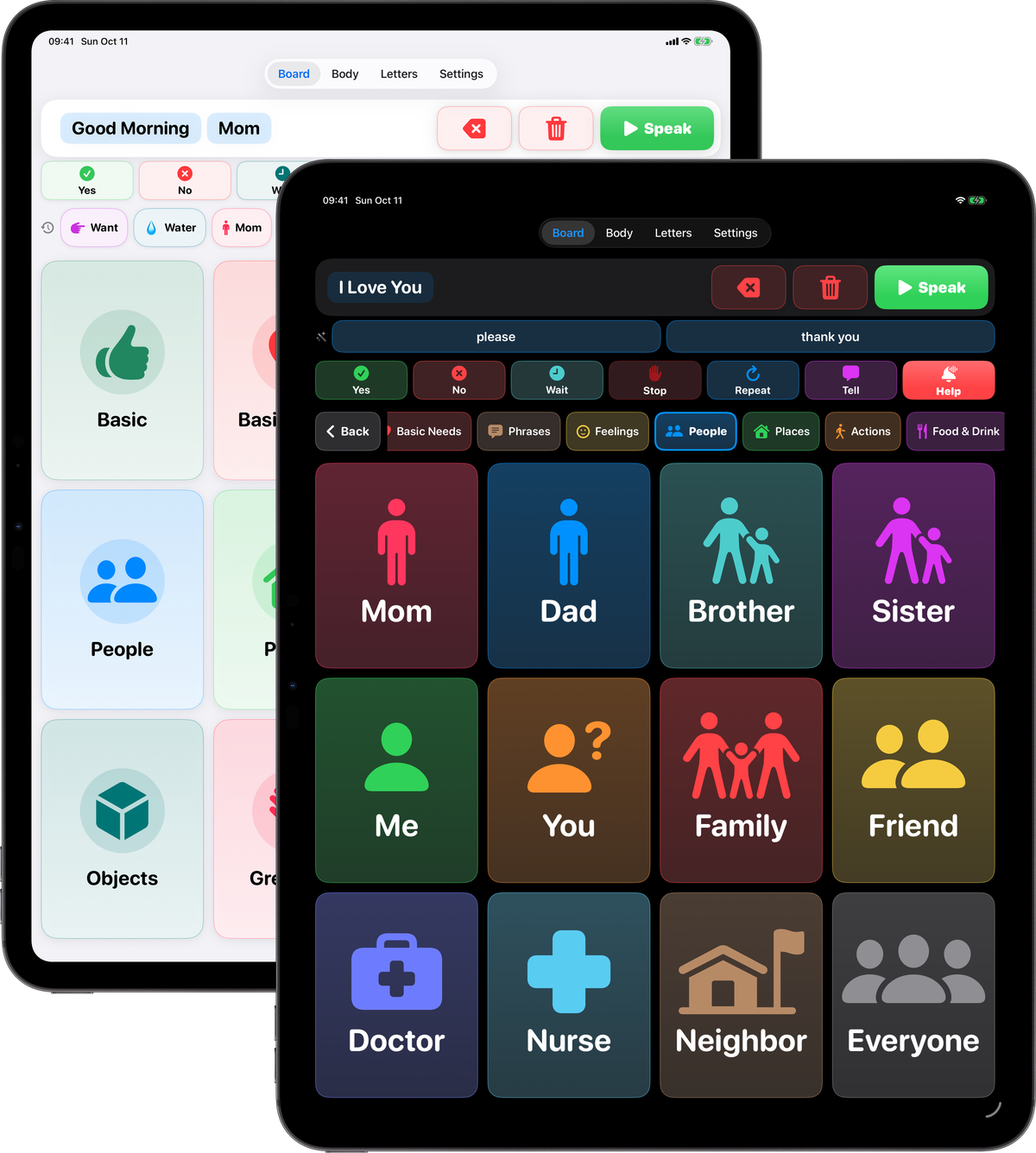
On iPad, the sentence, its Speak button and the whole word board fit on one screen, with a row that jumps to any category in one tap. In light or dark mode, every color stays easy to tell apart.

For Isaiah on two iPads: the category home screen in light mode, and the People board in dark mode in front

Also on iPhone

Always in your pocket, too.

For Isaiah is made first for iPad, and the same app works beautifully on iPhone, for appointments, car rides and anywhere the iPad can't go.

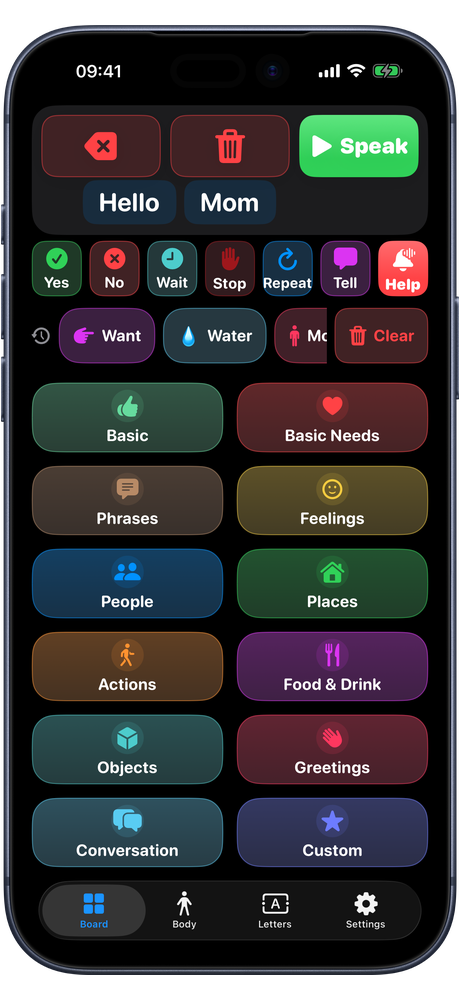
For Isaiah home screen on iPhone in dark mode: the sentence “Hello Mom”, quick buttons, recent words and twelve colored categories For Isaiah People board in dark mode: Mom, Dad, Brother, Sister, Me, You, Family, Friend, Doctor, Nurse, Neighbor and Everyone For Isaiah Body screen in dark mode: a colored 0 to 10 pain scale and a body map from head to foot For Isaiah letter board in dark mode, with word prediction, spelling “friend” For Isaiah Simple Mode in dark mode: four giant buttons, Yes, No, Help and Pain For Isaiah Basic Needs board in dark mode

Privacy

Private by design.

For Isaiah has no accounts, no analytics and no servers. Everything someone says, and everything a family sets up, stays on their own iPad or iPhone.

  • Nothing is uploaded. The app makes no network connections. Words, sentences, photos and recordings stay on the device.
  • Camera only for eye tests. The front camera is used only during the Eye Response tests, processed on the device and never saved.
  • Microphone only for recordings. Used only when a caregiver records a voice for a button.
  • Free, for good. No ads, no subscriptions, no in-app purchases.

Wishes for Isaiah

Send Isaiah a little love.

A kind word, a memory or a wish for Isaiah and his family. His family reads every one, and approved wishes appear on the wall below.

Your name and message will be shown on this page once approved. Please don't include phone numbers, addresses or other private details.

Thank you. Your wish was sent and will appear here once it's approved.

Your wish couldn't be sent. Please check both fields and try again.

No wishes on the wall yet. Be the first to leave one.

Free · now in beta

Free for anyone who needs a voice.

The beta is open on TestFlight: install TestFlight from the App Store, then tap Join the beta on your iPad or iPhone. For Isaiah will be free on the App Store when it launches. If you know someone who could use it, please pass it on.