
LoRa mesh firmwareBuilt on MeshCoreFree & open source
Your LoRa radio, with a real screen.
CAIRN is my build of the MeshCore companion firmware. Stock MeshCore mesh and radio underneath, with a complete interface on the device itself: chats, nodes, spectrum, offline maps and updates over Wi-Fi — no phone needed. It still pairs with the official MeshCore apps and the CAIRN app.

Four interfaces, one firmware
Made for the screen your radio actually has.
Every board is built from one source tree that shares MeshCore's mesh and radio code. What changes is the interface: a full touch UI on the big screens, a square one on the SF32, a one-button UI for small screens, and an on-screen status UI for repeaters.
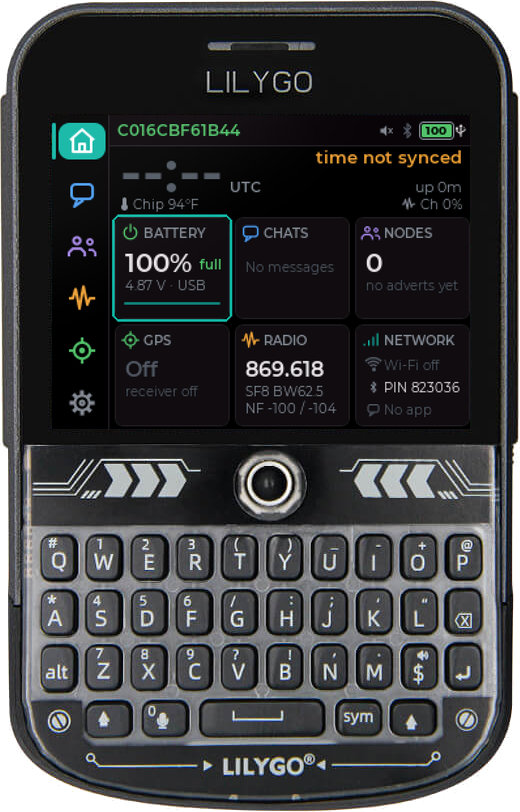
The CAIRN touch interface
A home dashboard, chats with a full keyboard and colour emoji, nodes, repeater scan and admin, spectrum and band scan, offline and online maps, Wi-Fi and Bluetooth scanners, and online updates. Nineteen pages, one thumb.
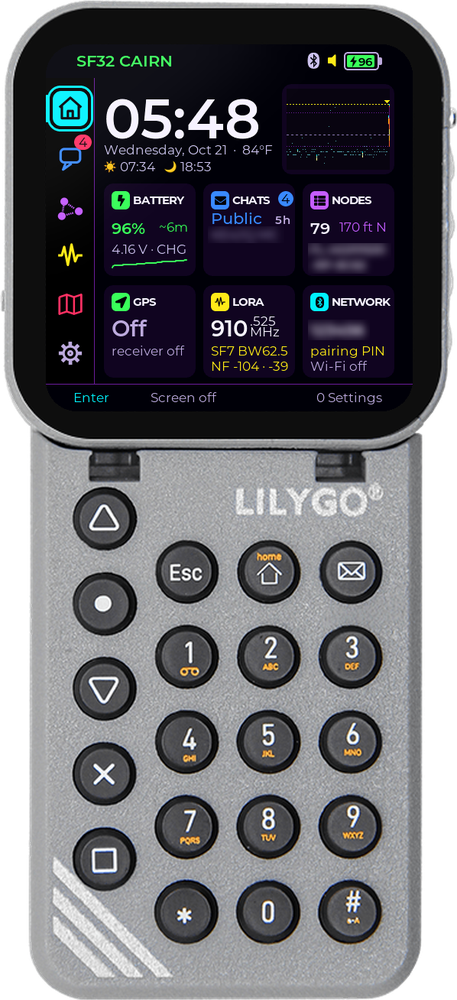
A native square interface
Built for the T-Display SF32's 480×480 AMOLED and its phone-style keypad: chats, nodes, spectrum, maps and more, plus its climate sensors, IR remote, music player and voice recorder.
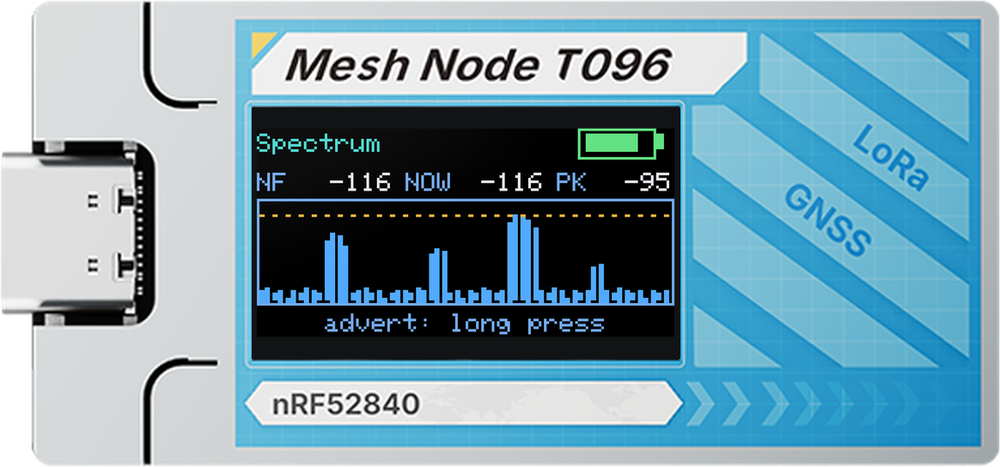
Compact interfaces
One button is enough: messages, nodes with a page for each, GPS and spectrum, in colour themes on the T096. The Wio Tracker L1 Pro gets an OLED and e-ink interface driven by its joystick.
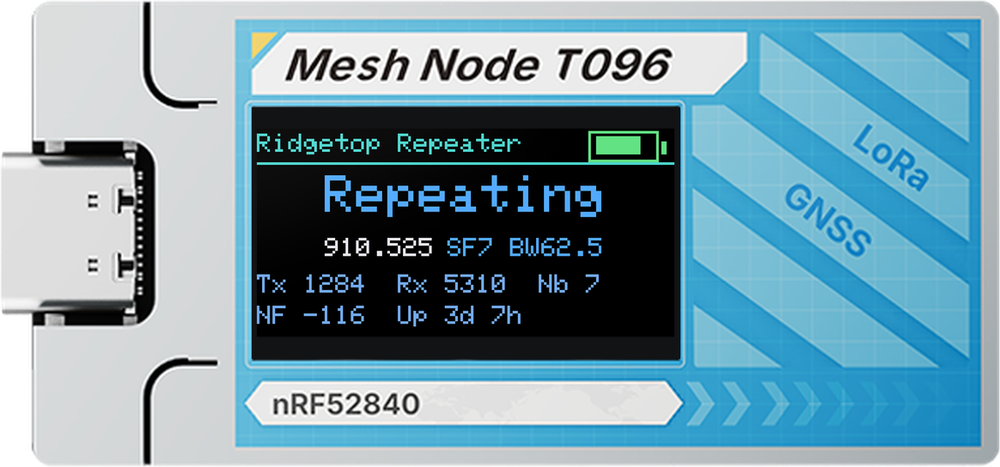
The compact repeater
The standard MeshCore repeater with a minimal Status, Spectrum and Settings screen, so you can check a repeater at a glance without plugging it into anything.
On the device
Everything you need off-grid, without reaching for your phone.
Chats & channels
Channels, DMs and rooms as bubbles, a full on-screen keyboard with colour emoji, and contact QR codes. Block a node and everything it sends is dropped.
Nodes & repeaters
Every node with hops, distance and bearing. Scan for the repeaters you can reach, then log in to one for its status, neighbours and settings.
See your channel
Live spectrum and channel airtime, a band scan with waterfall, and a traffic log with the details of every packet heard.
Find your way
A course compass, nodes by bearing and distance, offline maps from a microSD card, map downloads and an online map when there's Wi-Fi.
Updates itself
Checks GitHub releases, verifies the size, SHA-256 and board, and installs only after you confirm. The new build starts on trial and rolls back by itself if it fails to start.
Your radio in a browser
Turn on the Live page and open the radio's address on the same Wi-Fi: radio settings, noise floor, packets and nodes heard, battery and GPS, updated every second.
Screens
Every screen, on the device.
The touch interface, page by page. Swipe through — screens use fictional sample data.


On the device
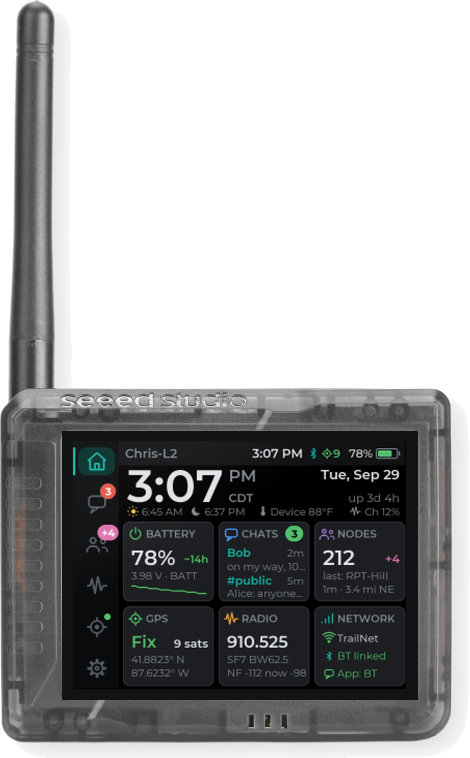
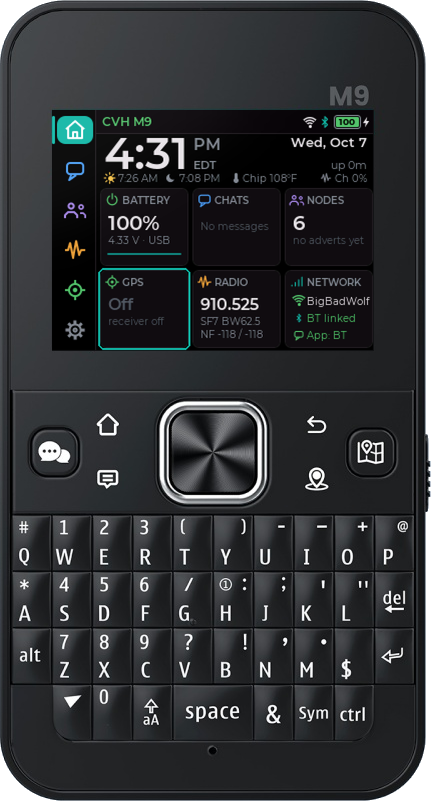
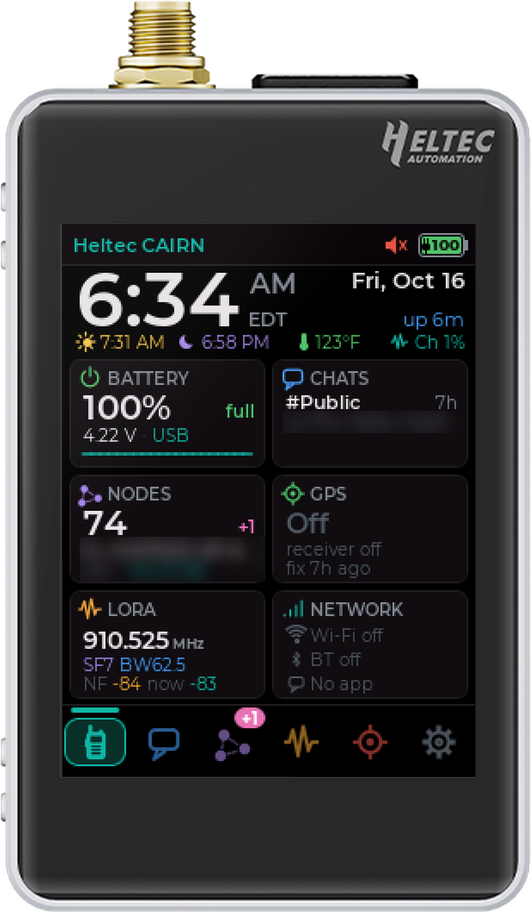
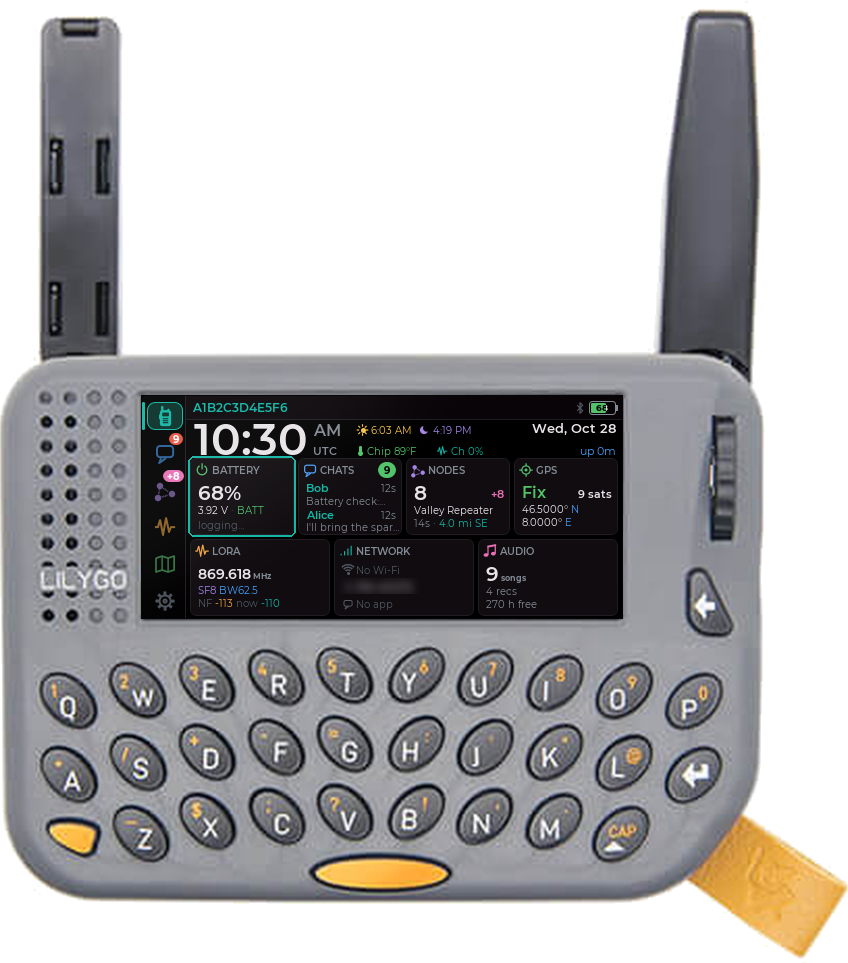
Device photos: Seeed, LILYGO, Elecrow and Heltec product shots, with CAIRN's screens in place of the original displays · screens captured on the boards, the T-LoRa Pager's from the CAIRN desktop simulator.
Supported boards
Find your radio.
Tested boards are used on real hardware before every release. Beta boards are tested on hardware but new to CAIRN. Preview and Experimental builds come from the same source but haven't been on my bench yet — reports are welcome, including "it works".
| Board | Screen and input | Status | Install | Updates |
|---|---|---|---|---|
| Touch and keyboard · the CAIRN touch interface | ||||
| Seeed Wio Tracker L2 Pro | 3.2" touchscreen | Tested | ESP32-S3 · .bin | Over Wi-Fi |
| Heltec V4-R8 + Expansion Kit V2 | 2.8" touchscreen | Tested | ESP32-S3 · .bin | Over Wi-Fi |
| Elecrow ThinkNode M9 | 2.4" screen, keyboard, d-pad | Beta | ESP32-S3 · .bin | Over Wi-Fi |
| LilyGO T-Deck / T-Deck Plus | 2.8" touchscreen, keyboard, trackball | Beta | ESP32-S3 · .bin or SD launcher | Over Wi-Fi |
| LilyGO T-LoRa Pager (SX1262 or LR1121) | 2.33" wide screen, keyboard, side wheel | Beta | ESP32-S3 · .bin | Over Wi-Fi |
| LilyGO T-Display SF32 + keypad | 480×480 AMOLED touchscreen, keypad | Tested | One-click installer | Over Wi-Fi |
| Compact companions | ||||
| Seeed Wio Tracker L1 Pro (OLED, DV1, e-ink, room server) | OLED or e-ink, joystick | Tested | nRF52840 · .uf2 | Copy the .uf2 |
| Heltec Mesh Node T096 (Bluetooth or USB) | 0.96" colour screen, one button | Tested | nRF52840 · .uf2 | Copy the .uf2 |
| Repeaters · the compact repeater | ||||
| Heltec Mesh Node T096 | 0.96" colour screen, one button | Beta | nRF52840 · .uf2 | Copy the .uf2 |
| Heltec T114, V2, V3, V4, V4-R8, Wireless Tracker V1 and V2 | TFT or OLED, one button | Preview | .uf2 or .bin | Over USB |
On the bench now
One-off test builds for new boards, published as GitHub pre-releases. The online updater never offers them.
About 30 more boards
Built from the same tree with the one-button interface, in the Cairn 107 preview release: not yet tried on hardware.
Don't see your radio? Ask for it on GitHub. Before installing on a Heltec V4, check which one you have: the Expansion Kit V2 touch build needs a V4-R8 (8 MB PSRAM).
Compare
What each board can do.
As of the latest release. The full comparison on GitHub has every feature and footnote.
| Feature | L2 Pro | Heltec V4 touch | ThinkNode M9 | T-Deck | T-LoRa Pager | T-Display SF32 | L1 Pro | T096 |
|---|---|---|---|---|---|---|---|---|
| MeshCore apps over Bluetooth | ✓ | ✓ | ✓ | ✓ | ✓ | ✓ | ✓ | ✓ |
| Input | touch | touch | keys | touch, keys | keys, wheel | touch, keypad | joystick | button |
| Colour emoji | ✓ | ✓ | ✓ | ✓ | ✓ | ✓ | – | – |
| Updates over Wi-Fi | ✓ | ✓ | ✓ | ✓ | ✓ | ✓ | – | – |
| GPS | ✓ | with the kit | ✓ | Plus | ✓ | ✓ | ✓ | ✓ |
| Offline maps (microSD) | ✓ | ✓ | ✓ | ✓ | ✓ | ✓ | – | – |
| Spectrum and band scan | ✓ | ✓ | ✓ | ✓ | ✓ | ✓ | – | spectrum |
| Repeater scan and admin | ✓ | ✓ | ✓ | ✓ | ✓ | ✓ | – | – |
| Block nodes on the device | ✓ | ✓ | ✓ | ✓ | ✓ | ✓ | ✓ | ✓ |
| Live page in a browser | ✓ | ✓ | ✓ | ✓ | ✓ | – | – | – |
| Spectrum and history to the CAIRN app | ✓ | ✓ | ✓ | ✓ | ✓ | – | – | – |
| Music player and voice recorder | ✓ | – | – | ✓ | ✓ | ✓ | – | – |
| Colour themes | ✓ | ✓ | ✓ | ✓ | ✓ | ✓ | – | ✓ |
| Room server build | – | – | – | – | – | – | ✓ | – |
Install and update
A few minutes, one file.
Every board's files are in the latest release under Assets, named after the board — MeshCore-WioL2Pro-Cairn127-…. The splash screen shows the build number, and each release has a SHA256SUMS.txt.
Drag and drop
Wio Tracker L1 Pro family, T096, T114 repeater.
- Plug in over USB and double-tap Reset. A drive appears.
- Copy the board's .uf2 onto it.
- It restarts on CAIRN. Update the same way.
Flash once, then Wi-Fi
L2 Pro, Heltec V4 touch, ThinkNode M9, T-Deck, T-LoRa Pager, ESP32 repeaters.
- Erase the flash, then write the -full.bin at 0x0 with esptool or a web flasher.
- From then on: Settings › System › Firmware update.
- Or write the -update.bin at 0x10000 over USB.
One click
LilyGO T-Display SF32.
- Download the -install.zip and unzip it.
- Double-click the installer for Mac, Windows or Linux.
- Update over Wi-Fi with the core docked on the keyboard board.
Updates keep your identity, contacts, channels and settings. A first install on an ESP32 board erases the device, so if it already runs MeshCore, export your identity and contacts in the app first.
Works with your apps
A bigger screen when you want one.
Every CAIRN build is fully compatible with the official MeshCore apps for web, Android and iOS, over Bluetooth, and over USB on the USB builds.
- CAIRN for iPhone and iPad. My free companion app pairs over Bluetooth or Wi-Fi for messages, repeater admin, spectrum and maps — and the touch boards send it their spectrum and history.
- Stock mesh underneath. CAIRN tracks MeshCore releases, so it talks to every other MeshCore radio on your mesh.


Questions
Before you flash.
Will it work on my MeshCore mesh?
Yes. All the mesh and radio behaviour is MeshCore's own, and CAIRN follows its releases. Each release's notes say which MeshCore version it's based on.
Will I lose my contacts?
Not when you update: identity, contacts, channels and settings stay. Only a first install over USB on an ESP32 board starts fresh, so export from the MeshCore app before you switch.
Which T-LoRa Pager file do I need?
Check the label on the box or the back: SX1262 units take TLoraPager, LR1121 units take TLoraPagerLR1121. The wrong one runs but has no radio.
What if an update goes wrong?
Wi-Fi updates start on trial and go back to the previous build by themselves if the new one doesn't start. Over USB you can always erase and flash the full image again.
What does it cost?
Nothing. CAIRN is open source under the MIT licence, the same as MeshCore — credit to the MeshCore developers and community for the foundation.
Found a bug?
Open an issue with your board, the file you flashed and the build number from the splash screen. A serial log from boot (USB, 115200 baud) helps a lot.
Manual and downloads
Everything in one place.
Firmware manual
Every board, screen and setting, with touch, key and OLED ways to do each task, a cheat sheet, troubleshooting and a glossary.
Open the manual →Downloads by board
Every file for every board, including the preview and experimental builds, and which one you need.
Find your files →Brochure
The firmware, the Wio Tracker L2 Pro and the 3D-printed case I designed for it, in nine pages.
Open the brochure →For hikers, event crews, emergency comms and radio tinkerers
Put CAIRN on your radio.
The latest release is Cairn 127, out 3 Nov 2026. Free, open source, and it keeps your contacts when you update.